

When developers compare GitHub vs GitLab, the choice can look confusing at first. Both platforms help teams host Git repositories, collaborate on code, review changes, manage projects, and automate software delivery. They also offer tools for security, CI/CD, and AI-assisted development, so the differences are not always obvious from the surface.
The real difference becomes clearer when you look at how each platform approaches the software development lifecycle. GitHub has built a huge ecosystem around repositories, pull requests, collaboration, and GitHub Actions, while GitLab takes a more integrated DevSecOps approach, bringing planning, source code management, CI/CD, security, and deployment into one platform.
So, which one should you choose? The answer depends less on which platform is “best” overall and more on what your team actually needs. A solo developer may prioritize simplicity and community, while an enterprise team may care more about security controls, deployment options, governance, and pipeline management.
What Is GitHub?
GitHub is a software development platform built around Git repositories and collaborative development. Developers can store source code, track issues, review changes through pull requests, organize work with Projects, and use automation to build and deploy applications. GitHub describes itself as supporting the software development lifecycle from planning through deployment and operations.
One of GitHub’s biggest advantages is its enormous developer ecosystem. When people publish open-source projects, documentation, examples, libraries, or developer tools, GitHub is often one of the first places they use. This creates a strong network effect: developers can discover projects, contribute to them, report issues, discuss ideas, and learn from existing code in the same environment.
GitHub also has a mature automation ecosystem through GitHub Actions. Developers can create workflows that automatically run tests, build applications, package software, and deploy projects when certain events occur. The GitHub Marketplace also provides a large collection of reusable Actions and integrations, which can make it easier to connect development workflows with external services.
For developers who care about community, open-source visibility, collaboration, and a familiar code-hosting experience, GitHub remains a very strong choice. Its platform is particularly attractive when a project benefits from being easily discoverable by the broader developer community.
What Is GitLab?
GitLab is another Git-based development platform, but its philosophy is somewhat different. Instead of focusing primarily on repository hosting and collaboration, GitLab has positioned itself as a more comprehensive DevSecOps platform. It combines source code management with planning, CI/CD, security, compliance, and deployment capabilities.
That integrated approach can be especially useful for organizations that want fewer separate tools in their software delivery stack. Rather than connecting one product for source control, another for CI/CD, another for security scanning, and additional services for planning and analytics, teams can use GitLab as a central platform for much of the workflow.
GitLab also offers both SaaS and self-managed deployment options, which can matter to organizations with strict infrastructure, compliance, or data-residency requirements. Its self-managed model gives companies more control over where the platform operates and how it is integrated into internal environments.
Another important point is that GitLab is open core. The platform’s core is open source, which fits well with organizations and developers who value transparency and the ability to inspect or contribute to the underlying software. For teams that prioritize DevSecOps integration and deployment flexibility, GitLab can be a compelling alternative to GitHub.
GitHub vs GitLab: Main Differences
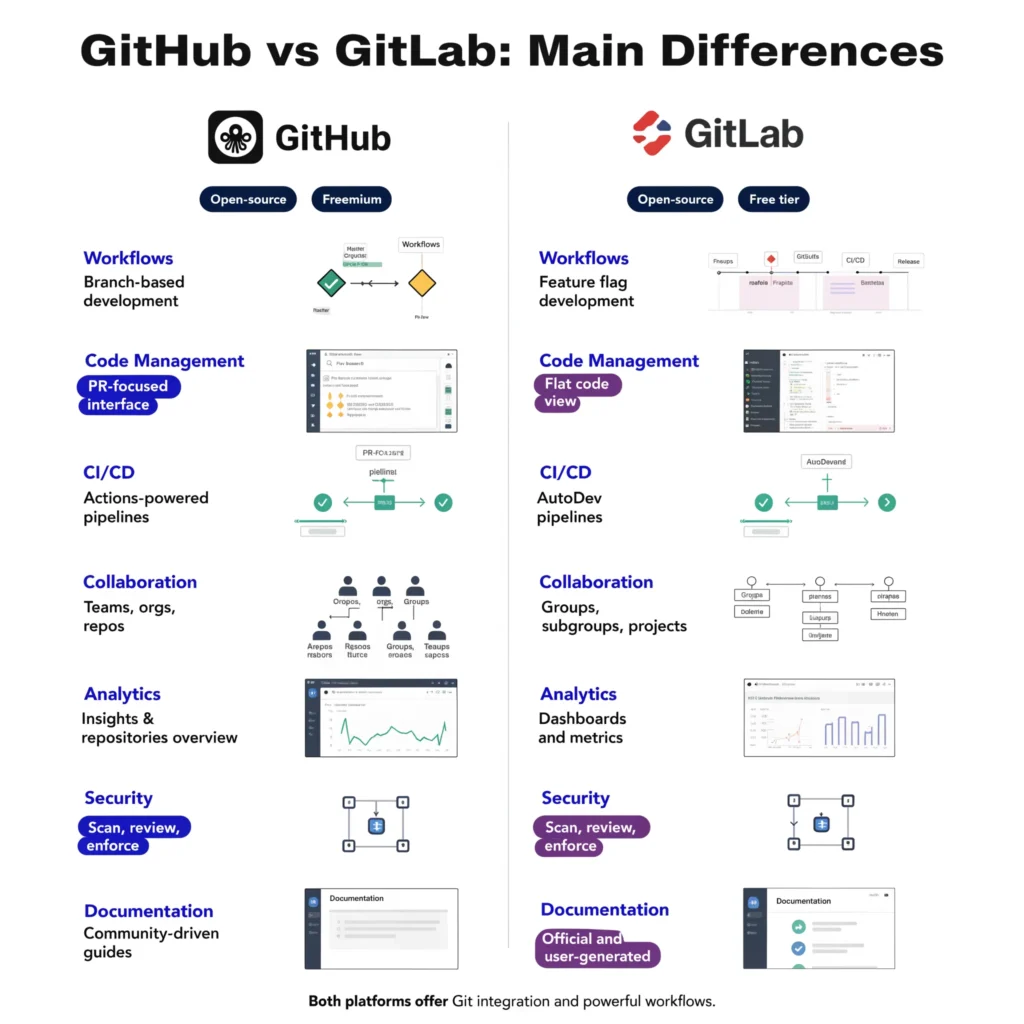
The biggest difference between GitHub and GitLab is the overall philosophy behind each platform. GitHub has a strong reputation for code collaboration, open-source development, repository hosting, and its broad ecosystem of integrations. GitLab, meanwhile, emphasizes having a unified platform for the complete DevSecOps lifecycle.
This distinction becomes important when a team grows. A small project may simply need Git repositories, pull requests, issue tracking, and basic automation. In that situation, either platform can work extremely well. As projects become more complex, however, teams may start caring about pipeline orchestration, security scanning, compliance, project-level governance, deployment environments, and development analytics.
GitHub can handle many of these requirements, but some advanced capabilities may involve additional products, marketplace integrations, or external tooling. GitLab’s approach is to place more of these capabilities within one integrated platform. GitLab’s current feature comparison highlights built-in CI/CD, security capabilities, planning tools, and value-stream features across its paid tiers.
Another difference is the development experience around collaboration. GitHub uses pull requests as a central mechanism for reviewing and merging code, while GitLab uses merge requests. The terminology is different, but the basic purpose is similar: developers propose changes, teammates review them, automated checks run, and approved changes are merged into the project.
GitHub vs GitLab for CI/CD
CI/CD is one area where the differences become especially interesting. GitHub provides GitHub Actions, a powerful automation system that lets developers define workflows for building, testing, and deploying software. Because the Actions ecosystem is large, developers can find reusable components for many common development and deployment tasks.
GitLab provides integrated CI/CD as part of its platform. GitLab’s approach includes features such as parent-child pipelines, multi-project pipelines, reusable configuration, pipeline graphs, and GitLab Runner. These capabilities can be particularly valuable for organizations operating complicated software delivery workflows across multiple projects or repositories.
The choice therefore depends on how much pipeline complexity your organization expects. GitHub Actions can be an excellent fit when you want a flexible ecosystem and are comfortable assembling workflows around Actions and integrations. GitLab can be attractive when you want advanced CI/CD orchestration to be deeply connected with the rest of your development and DevSecOps environment.
There is also no requirement that teams treat the platforms as completely isolated choices. GitLab supports connecting to GitHub repositories and running GitLab CI/CD against code hosted on GitHub. That can be useful for organizations that want to keep their existing GitHub repositories while experimenting with GitLab’s CI/CD capabilities.
GitHub vs GitLab for Security
Security is another major consideration when comparing GitHub and GitLab. Modern software teams need more than simple repository permissions. They may need secret detection, static application security testing, dependency analysis, container scanning, vulnerability management, and centralized security policies.
GitHub offers security capabilities through its GitHub Advanced Security products and related features. Organizations can use tools such as code scanning and secret protection to identify security issues during development. However, the exact security functionality available depends on the plan and products selected.
GitLab takes a more integrated security approach through its DevSecOps model. Its platform includes capabilities such as SAST, secret detection, and container scanning, with additional security and compliance features available at higher tiers. The idea is to bring security findings into the same environment as source code, issues, merge requests, and pipelines.
For a small personal project, these distinctions may not matter much. For a larger company operating sensitive applications, however, security integration can have a major impact on the overall development process. The more security checks can happen automatically inside the normal workflow, the easier it becomes to identify problems before they reach production.
GitHub vs GitLab for AI Development
AI-assisted development has become another important part of the GitHub vs GitLab conversation. GitHub offers GitHub Copilot, which can help developers with coding tasks, explanations, documentation, testing, and other repository-focused activities. GitHub has also expanded Copilot capabilities toward agentic development and automated coding workflows.
GitLab has taken a broader approach with GitLab Duo and its Agent Platform. The platform is designed to use context from across the software development lifecycle, including issues, merge requests, pipelines, environments, and security findings. GitLab’s recent releases have continued to expand its agentic development and automation capabilities.
This creates an interesting distinction. If your main interest is AI-assisted coding inside a repository-centric workflow, GitHub’s Copilot ecosystem can be very appealing. If you want AI agents to work across planning, coding, CI/CD, security, and other parts of the delivery process, GitLab’s broader platform approach may be worth considering.
AI capabilities are changing quickly, so this is one area where today’s comparison can become outdated faster than traditional Git features. Teams should check current plans, privacy terms, model availability, and enterprise controls before making a purchasing decision.
GitHub vs GitLab: Which One Should You Choose?

For individual developers and open-source contributors, GitHub is often an easy starting point. Its large public developer community, familiar repository workflow, extensive ecosystem, and collaboration features make it convenient for projects that benefit from visibility and community participation.
GitLab may be the stronger option for organizations that want a more unified DevSecOps platform. Its integrated CI/CD, security, planning, analytics, and deployment capabilities can reduce the need to stitch together multiple products. This can become particularly valuable as engineering teams grow and software delivery becomes more complicated.
That doesn’t mean GitLab is automatically better for every company, just as GitHub isn’t automatically the best choice for every developer. The right decision should consider your team’s existing workflow, required integrations, security requirements, deployment model, CI/CD complexity, budget, and future growth.
A practical approach is to test both platforms with a real project rather than judging them purely from feature lists. Create a repository, configure a CI/CD workflow, invite a few team members, test code review, try security features, and see how comfortable developers feel using each platform.
Read more: Dino Fetscher
Final Verdict: GitHub vs GitLab
So, GitHub vs GitLab — which one wins? There isn’t one universal winner. Both platforms are mature choices for modern software development, but they shine in slightly different areas.
GitHub is particularly strong for repository-based collaboration, open-source development, developer community engagement, and a large ecosystem of integrations and automation. Its pull-request workflow and GitHub Actions make it a practical option for everything from personal projects to large engineering organizations.
GitLab stands out when the priority is bringing the software delivery lifecycle together. Its integrated DevSecOps approach connects planning, code, CI/CD, security, and deployment, while its self-managed options provide additional flexibility for organizations with specialized infrastructure requirements.
Ultimately, choose GitHub if ecosystem, collaboration, and open-source visibility are your biggest priorities. Choose GitLab if integrated DevSecOps, advanced CI/CD, security, and platform consolidation matter more. And if you’re still unsure, run a small pilot with both. In real-world development, the platform that fits your team’s workflow best will usually beat the one that simply has the longer feature list.